KEEN system administrator’s guide
This guide covers deployment, access control, collection, application-managed configuration, recovery and troubleshooting. Application administrators maintain frameworks and evidence definitions in KEEN. Systems administrators operate the runtime, credentials, networking and backups. In a managed installation, the hosting operator performs the server tasks.
1. Runtime and responsibilities
KEEN runs as six Docker Compose services. keen-ui serves static HTML and JavaScript through nginx and proxies /api/ requests to keen-api. keen-api runs FastAPI. keen-worker executes Celery tasks. keen-beat schedules background work. PostgreSQL stores application records and configuration; Valkey provides sessions, caching, rate limits, background-job messaging and notifications.
Artefacts use the configured local storage backend or S3-compatible storage. The standard Compose configuration includes pgdata, beatdata and artifacts volumes. The API and worker must see the same artefacts. PostgreSQL contains the references, mappings and configuration needed to interpret those objects; an object backup alone is not a complete KEEN backup.
The external HTTPS proxy forwards to the UI listener, bound to 127.0.0.1:8081 in the supplied Compose file. Do not expose PostgreSQL, Valkey or the API directly to the internet. Scrub client-supplied identity headers at the proxy. Native OIDC uses KEEN’s session cookie, not a trusted username supplied by a browser.
2. Deploy a self-managed installation
Use a supported Docker Engine and Compose plugin, DNS for the application, a trusted TLS certificate and sufficient storage for the database, artefacts and build cache. The UI build context must contain keen and the mosp-design-system repository as siblings. The supplied KEEN archive alone does not contain that design-system dependency.
- Place the code and matching design-system dependency in the expected layout. Record the release or commit used for each.
- Create a protected .env using the release’s settings. Configure the database, Valkey, public URL, authentication and artefact backend. Use unique secrets.
- Configure the HTTPS proxy and firewall. Keep internal services on the private Compose network.
- Build the images, start the backing services, apply the migrations and start the application services.
- Verify HTTPS, sign-in, framework catalogues, an artefact round trip, one ingestion and a restore into a separate test environment.
Run from the keen directory. These commands are for the supplied self-managed Compose layout, not the generated hosted Compose file.
docker compose build
docker compose up -d postgres valkey
docker compose run --rm keen-api alembic upgrade head
docker compose up -d
docker compose ps
docker compose logs --tail=100 keen-api keen-worker keen-beat
The API startup script also applies migrations. An explicit migration step makes failures visible before the rest of an upgrade proceeds. Never run competing migration processes against the same database.
For local bootstrap, set KEEN_BOOTSTRAP_ADMIN_USERNAME and KEEN_BOOTSTRAP_ADMIN_PASSWORD before initial startup. Verify the administrator can sign in, protect the bootstrap values and follow your credential-management process. In hosted mode, owner provisioning uses the separate hosted bootstrap and must not create a generic shared administrator.
3. Configure the runtime
The definitive environment schema is services/api/app/core/config.py. Most fields use the KEEN_ prefix, but some connector secrets have explicit aliases. Apply the same relevant settings to API, worker and beat. Restart or recreate affected containers after environment changes; changing a host’s .env does not change an already running container’s environment.
Core and authentication settings
KEEN_DATABASE_URL connects to PostgreSQL. KEEN_REDIS_URL connects to Valkey. KEEN_PUBLIC_BASE_URL is the externally reachable HTTPS origin used in application links. KEEN_TIMEZONE and KEEN_UI_DATE_FORMAT define installation defaults; users can have their own presentation preferences.
KEEN_LOCAL_AUTH_ENABLED controls local sign-in. KEEN_COOKIE_SECURE should remain true for production. KEEN_COOKIE_SAMESITE and KEEN_CSRF_COOKIE_SAMESITE must suit the chosen authentication flow; test the complete cross-site OIDC redirect, not only the login page. Keep KEEN_COOKIE_DOMAIN empty for host-only cookies unless a separately reviewed deployment requires otherwise.
Native OIDC uses KEEN_OIDC_ENABLED, issuer, authorisation and token endpoints, JWKS URI, client ID, client secret, scopes and an exact redirect URI. Configure the corresponding logout URLs where supported. Keep TLS verification and the asymmetric algorithm allowlist. Provision authorised local identities according to the selected mode; do not enable unrestricted automatic provisioning as a shortcut.
Google and GitHub integrations have their own enablement, client and claim settings. Trusted remote-user mode is separate and requires a trusted proxy that strips incoming identity headers and supplies verified identity. Do not trust a header from an internet client. Hosted mode disables local and trusted-header authentication and requires its configured owner subject and OIDC issuer.
Session settings include KEEN_SESSION_TTL_SECONDS and the session-cookie name. Login rate limiting uses the configured window and per-IP/per-username limits. Valkey availability is therefore security-critical as well as operationally important.
Storage, mail and privacy settings
KEEN_ARTIFACT_STORAGE_BACKEND accepts the configured backend selection; KEEN_ARTIFACT_LOCAL_DIR sets local storage. For S3, configure bucket, region, endpoint and credentials as required. KEEN_S3_USE_INSTANCE_ROLE enables the AWS credential chain in the hosted integration. Do not combine its tenant role with broad static AWS credentials.
SMTP settings include KEEN_SMTP_HOST, port, username, password, TLS or SSL mode, sender address/name and timeout. Match TLS mode to the mail service. Configure the public base URL before testing audit invitations.
KEEN_EVENT_DATA_MASKING controls optional data masking. Sample PDF header/footer and evidence filename-prefix settings control export presentation. Review exported samples to confirm the intended wording and data treatment. Automatic secret redaction is a defence, not permission to ingest unnecessary secrets.
KEEN_SCHEDULED_AUDIT_CREATE_DAYS_AHEAD controls how far ahead scheduled audits are materialised. Outbound question, reply and incident integrations have separate webhook destinations, optional signing secrets and timeouts. Store these as secrets where appropriate and test delivery without placing credentials in audit notes.
4. Manage frameworks and the risk library
Use Admin → Frameworks for normal framework maintenance. Select a framework or choose New framework, enter its slug and descriptive fields, and Save framework. Add Clause, Control or Custom nodes with references, titles, hierarchy, scope and related clauses. Save a small change and inspect the result before a broad edit.
Slugs and node identities are stable identifiers. The editor does not rename them in place. Deletion may be blocked by children, clause relationships or evidence mappings. Review the impact on linked risks, audits and other records before removing content. Do not use direct SQL deletion to evade a dependency check.
The migration chain seeds the bundled framework catalogues, including KEEN Assurance Framework (KEEN-AF:1.0), and the reusable risk library. Seed data is shipped with the release; it is not fetched live from an external standards website. Framework and risk-library changes made in the application belong in PostgreSQL backups.
Risk register settings apply to the shared set of risk scenarios. The editor, register and heatmap use the same 1–5 likelihood and impact fields for inherent and residual scoring. Library templates are reusable starting points. Their suggested ratings and KEEN-AF control links need local review. Existing risks are not a second library to overwrite when a template changes.
5. Operate evidence definitions
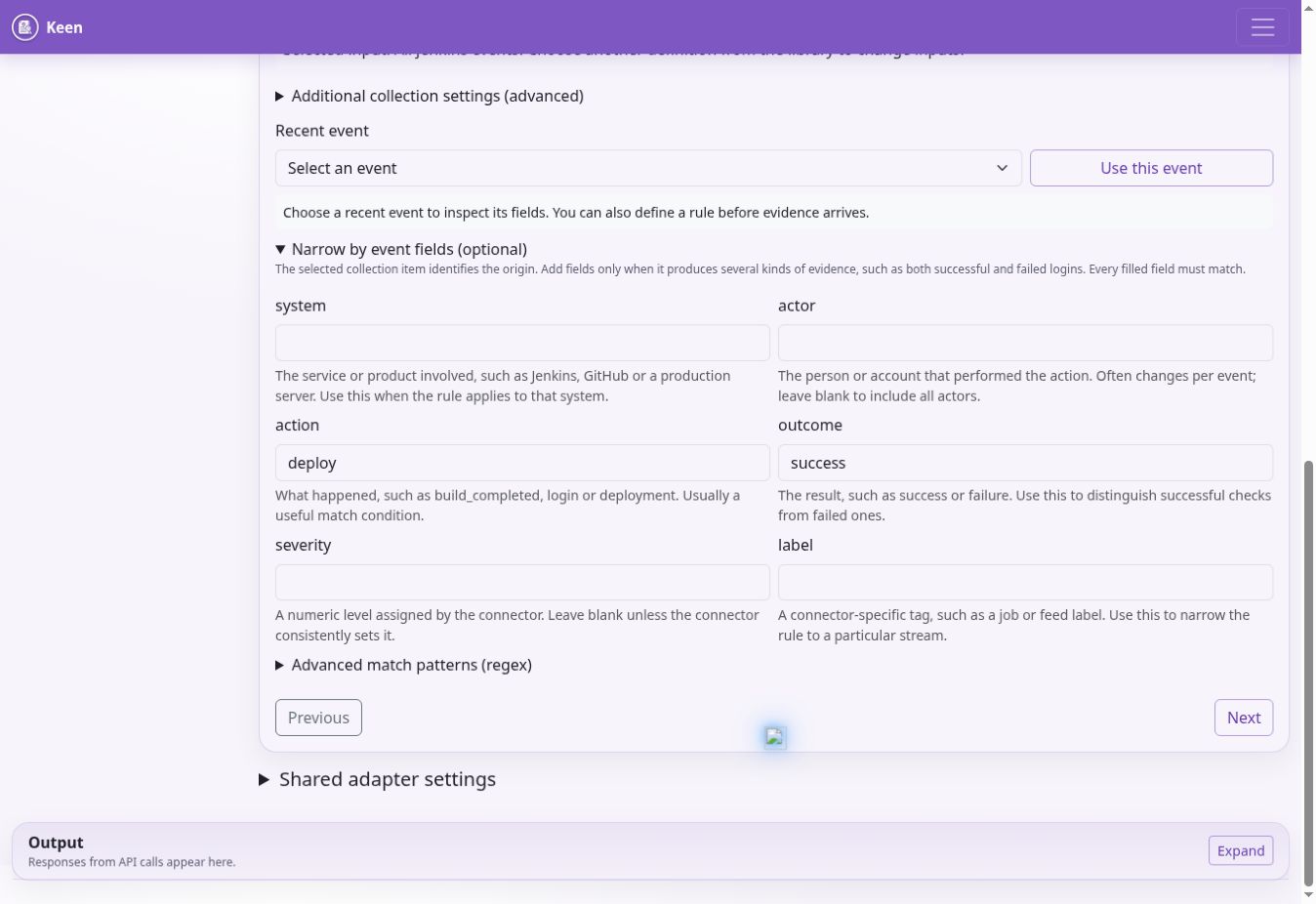
Admin → Evidence sources & rules is the authoritative working interface for collection inputs and mappings. The Source catalogue distinguishes adapter enablement, collection items, definitions and observed events. Connection credentials and adapter enable flags stay in the server environment.
Create evidence definition has four steps: describe the evidence; collect and recognise; select framework controls or clauses; preview and save. Select an existing collection item when it is shared. Creating another definition for the same item lets different event outcomes map to different targets without duplicating collection.
Choose All events from this source only when a source-wide match is intended. Otherwise keep the rule tied to its query, job, feed, project, stream or page. Stable collection identifiers prevent evidence from another input being treated as interchangeable merely because it uses the same adapter.
Use Recent event and Use this event to inspect normalised fields. Every supplied matching condition is conjunctive. Prefer exact field matches; use advanced regex only where necessary. Select every intended target explicitly and review any description-based suggestions. Target references must exist in the selected framework.
Preview matches before saving, checking negative examples as well as positive ones. Select Predefine only when evidence is not available, then schedule a review after first collection. Confidence is between 0 and 1. Disabling a definition stops its application in the rule set; it does not prove that every historical mapping has been removed.
Configuration storage and concurrency
PostgreSQL holds managed configuration documents and their revisions. The evidence-definition save path publishes its collection item and rule together and checks configuration versions. A 409 conflict means another writer changed the data: reload, inspect the newer version and reconcile deliberately.
The migration chain initialises managed configuration from the supplied inputs or existing database overrides. Once those records exist, database configuration takes precedence. Editing a mounted rules.yml or connector YAML file is not the normal way to change a migrated installation. Preserve bootstrap files for recovery and provenance, but back up the database to preserve live settings.
Additional collection settings is an advanced per-item JSON panel. Shared adapter settings applies common adapter options. Neither is a credential store. Keep connector-specific fields consistent with the adapter schema and retain a configuration revision before a substantial change.
6. Connect operational sources
For each connector, enable it, provide a least-privilege upstream identity, create collection inputs in the evidence-definition editor, run a small collection, inspect the actual normalised fields and preview the mapping. Test outbound HTTPS and upstream permissions from the runtime network. Do not disable certificate verification to make a connector work.
Loki and CloudWatch Logs
Loki uses KEEN_LOKI_ENABLED, its base URL and configured basic or header authentication. Define named LogQL queries in the application and set normalised source/system/action/outcome/severity fields where appropriate. Initial lookback, maximum query range, overlong-range strategy and catch-up chunks constrain backlog processing.
CloudWatch Logs uses KEEN_CLOUDWATCH_LOGS_ENABLED, the configured region and an AWS identity with access to the necessary log groups. Define a query’s name, region, log group, filter pattern and event fields in the editor. A hosted tenant’s default IAM role does not grant access to arbitrary customer AWS logs; arrange a narrowly scoped integration rather than widening it across tenants.
GitHub, Forgejo and Jenkins
GitHub supports organisation, repository and feed inputs. Configure KEEN_GITHUB_ENABLED and its base URL as required; secret aliases include GITHUB_TOKEN and GITHUB_USERNAME. Review upstream API quotas and restrict repository access to the intended scope.
Forgejo feed collection uses its configured base URL and authentication mode. Secret aliases include FORGEJO_TOKEN, FORGEJO_USERNAME and FORGEJO_COOKIE. Use only the credential mode needed by the deployment, and preserve the source URL’s HTTPS protections.
Jenkins uses KEEN_JENKINS_ENABLED, KEEN_JENKINS_BASE_URL, JENKINS_USERNAME and JENKINS_API_TOKEN. Define jobs by stable name. The job’s kind becomes the event action and label becomes its system. A condition looking for deploy will not match an event whose action is deployment; inspect the actual evidence rather than copying an example blindly.
Taiga, BookStack, RSS and Google Workspace
Taiga uses enabled/base URL settings and its configured token or supported credentials. Add project IDs and labels in the application. Confirm the upstream account can read the intended projects.
BookStack uses KEEN_BOOKSTACK_ENABLED, KEEN_BOOKSTACK_BASE_URL, BOOKSTACK_TOKEN_ID and BOOKSTACK_TOKEN_SECRET. Browse the server-backed book/page catalogue in the editor. Choose pages and configure capture options through the supported settings. Imported selectors can continue to identify pages by book, slug, title or pattern. Check captured content and section handling before relying on a policy extract as evidence.
RSS/Atom uses KEEN_RSS_ENABLED and named feed inputs with URL, label, system and optional item/overlap limits. Feed access remains HTTPS-verified. Use a small known feed first and confirm how publication timestamps and duplicate items are handled.
Google Workspace uses KEEN_GOOGLE_WORKSPACE_ENABLED, the configured service-account material and impersonation identity. Grant the required upstream scopes and delegation deliberately. Configure named streams with application, user key and system. Keep private-key material out of collection definitions and browser-visible settings.
Incoming webhooks and metrics
Webhooks use provider configuration, a configured secret header and a server-side secret reference. The API authenticates these endpoints independently of browser sessions. Preserve timestamp/replay checks and rate limiting, and restrict ingress at the proxy where practical. Do not expose an unauthenticated endpoint merely because the application’s normal pages require login.
Effectiveness-measure metrics have their own ingestion routes and payload requirements. Check the running API schema and configured provider before integrating. Validate a test observation against the intended measure and period. Do not confuse a generic evidence event with a metric observation.
7. Scheduling, manual runs and cursors
Celery beat schedules source tasks and other maintenance work. Run only one scheduler for the intended schedule unless the deployment explicitly supports coordinated schedulers. Check both beat’s enqueue logs and the worker’s execution logs when a scheduled action is missing.
In this release, the beat schedule is defined in app/worker/celery_app.py. Cron minute expressions are minute-of-hour selectors, not arbitrary elapsed intervals. In particular, expressions such as */75, */95 or */110 must not be described as reliable 75-, 95- or 110-minute polling. Review and correct those shipped entries before depending on those cadences; use an interval schedule for an elapsed interval longer than an hour.
Admin → Import & ingest starts an enabled source outside its normal schedule. Read the result, then inspect the Events list. A successful task can collect zero new events. Compare the source, upstream data, time range and cursor before changing configuration.
Cursors record collection progress and their meaning varies by adapter. Before a cursor repair, stop concurrent ingestion, record the current cursor, take a database backup and understand the adapter’s lookback/pagination semantics. Rewinding can reprocess data; advancing can permanently skip upstream history. Resume with a bounded run and verify counts and timestamps. There is no universal safe cursor-reset command.
8. Historical mapping and revision recovery
Saving with Apply this rule to previously collected evidence in the background queues historical evaluation. Jobs are durable and resumable; inspect progress and failure information before launching duplicates. Worker and beat availability matter to job recovery. A saved rule and a completed backfill are separate outcomes.
Apply saved rule to past evidence starts a job for an existing definition. Admin → Remap offers broader filtering. By default it finds events with no mappings; Include already-mapped events allows additive mapping of those already linked. Choose a bounded source/time range first.
Tightening a rule does not by itself remove every previous automatic mapping. Use the stale-mapping review, inspect one batch of at most 500, and prune only the reviewed result. The implementation preserves manual and imported mappings and rechecks current rules. Repeat carefully because the result set can change after removal.
Restore a prior rule set recovers configuration, not a full historical snapshot of mappings, evidence and audits. After restoring, preview examples, apply the desired historical evaluation and separately review stale automatic mappings. If aggregate counts remain wrong, investigate the control-evidence statistics and cache rather than duplicating evidence.
9. Upgrade safely
Record the current image versions, database revision and configuration before an upgrade. Take a database backup and protect the corresponding artefacts, encryption material and environment secrets. Restore that backup in a test environment and rehearse the upgrade before changing a customer instance.
Quiesce ingestion and writes for the maintenance window where a consistent rollback point is required. Build or pull the reviewed release, run alembic upgrade head once, start the API/UI and worker, and start beat after checking migrations. Verify sign-in, a framework node, an existing risk, a document version, a mapped event and an artefact download.
A container rollback is safe only if the earlier application understands the migrated schema. Otherwise restore the pre-upgrade database and compatible object state into an isolated recovery environment. Do not run an Alembic downgrade against production without a reviewed data-loss analysis.
For routine service inspection use docker compose ps and scoped logs. docker compose stop preserves volumes; docker compose down -v removes them and is not a routine restart command. Avoid printing the fully resolved Compose configuration into shared logs because it can contain secrets.
10. Backups and restore
Back up PostgreSQL, all referenced artefact storage, configuration/secrets and the release identifiers needed to rebuild the runtime. A live copy of the database’s volume is not a substitute for an application-consistent database backup. Use encrypted destinations and access controls independent of normal application access.
For the standard self-managed Compose service, a custom-format PostgreSQL dump can be created as follows. Store the output on a protected backup destination and monitor the command’s exit status.
umask 077
docker compose exec -T postgres sh -c 'pg_dump -U "$POSTGRES_USER" -d "$POSTGRES_DB" -Fc' > keen-postgres.dump
Test restores into a separate, empty recovery database. Restore the matching artefacts and keys, use the compatible application release, disable outbound notifications and ingestion until validated, and check representative records and artefact checksums. Keep the original production environment intact until the recovery copy is verified and an intentional cutover is agreed.
For S3, inventory object versions and retention dates. For local artefacts, include the shared artefact volume in the backup procedure. Preserve metadata needed to resolve each stored artefact reference. Encryption is only recoverable if the corresponding keys and permissions remain available.
A retention period and a deletion policy are different. Object Lock prevents premature removal; expiry does not itself erase every retained version. Define and test lifecycle/deletion procedures, including noncurrent versions, legal holds and backup copies. Record the last successful backup and last successful restore test separately.
11. Dedicated hosted operations
The hosting implementation provisions a separate EC2 instance, VPC/security boundary, IAM role, encrypted storage and S3 bucket per customer. This is virtual-machine isolation on AWS, not an AWS Nitro Enclave or a dedicated physical server. Runtime permissions are scoped to that customer; the privileged provisioning and recovery roles require separate operator protection.
The selected region governs application storage, artefacts and regional backups. Portal account records, identity-provider data, DNS and operator support have separate processing locations and must be disclosed accurately. Do not promise that every service component stays in the chosen AWS region.
Hosted authentication pins the owner’s issuer and subject. Do not authorise by email suffix, hostname alone or an IdP login without the tenant-specific check. Cookies stay host-only and browser mutations check the exact origin. Test that customer A cannot authenticate to customer B’s instance or retrieve B’s objects, backups or secrets.
Daily database dumps, regional snapshots, health monitoring and EC2 recovery support recovery but do not provide high availability. EC2 recovery addresses supported infrastructure failures; it does not repair database corruption, all software failures or a regional outage. Treat missing health or backup telemetry as a condition needing investigation.
The supplied hosting code requires deployment validation before accepting customers. Confirm alarm subscribers, restore procedures, backup size limits, immutable retention and final deletion, identity recovery, certificate renewal and the promised support process. The operational service order must state the actual retention, recovery objectives and support hours. Do not infer contractual guarantees from a cron job.
12. Diagnose problems in order
If the API fails at startup, inspect its logs for invalid settings, database connectivity and migration errors. Confirm that the configured database exists and credentials match. If worker or beat cannot connect, check KEEN_REDIS_URL and the private service network.
If the UI loads but requests fail, inspect the browser-visible error and nginx/API logs. Browser API URLs begin /api/v1/; the API receives /v1/. Check proxy rewrites, TLS forwarding and cookie settings. A 401 concerns authentication; a 403 can concern permission or CSRF. Do not resolve either by disabling the relevant control.
If OIDC fails, compare the exact issuer, client, callback URL, JWKS and host origin. Check clock accuracy and whether a prior login state was already consumed. In hosted mode, confirm the correct owner subject without exposing ID tokens or client secrets in logs.
If ingestion is disabled, check the adapter flag. If it runs without evidence, check its collection items, credentials, upstream permissions, filters and cursor. If evidence arrives but does not map, preview the definition against that exact event and check collector identity, field values and existing framework targets.
For S3 AccessDenied, compare the runtime principal, bucket, prefix, encryption key and any required conditional-write headers. In hosted mode, a denial against another customer’s resource is expected. Never solve an access error by adding wildcard permissions.
For stale UI behaviour, verify the deployed UI image and asset cache before changing data. For stale counts, check the aggregation/cache refresh path. For failed mail or outgoing webhooks, inspect the task result and destination configuration; avoid repeated notifications while diagnosing.
13. Routine assurance checks
Review backup success and capacity daily according to the service process. Investigate failed collections, missing metrics and expired credentials. Periodically test restoration, customer isolation, owner account recovery and alert delivery. Review unused accounts, group permissions and upstream integration privileges.
Use the entity changelog for content changes and the request log for API activity. Protect those logs and minimise sensitive request data. Retain operational evidence of maintenance, incident response and restore testing so your own hosting service can be assessed with the same discipline as its customers’ systems.
Documentation edition: 2 October 2026