Using Keen
Effectiveness measures and metric submissions
Chapter 12 of 17
Measure effectiveness
An objective says what you want. A measure says how you will tell whether you got it. A metric entry is one dated observation. This chapter shows how to define a measure, record observations by hand or from another system, and read the results without fooling yourself.
Define measures and record observations
- Open ISMS → Effectiveness measures. The Summary names what is measured in one line; the Description explains how the value is calculated, where the numbers come from and which exclusions apply. Write it so that someone who did not design it can repeat it.
- Enter the pass condition: the Threshold operator, Target value and Unit, for example at least 95 %. Choose No target for qualitative measures. Choose the Expected source, the Keen evidence source that supplies the values, or Other. If another system will submit observations, choose a stable Metric key. Then enter the owner, frequency, notes and linked controls.
- Save the measure. In Record metric entry, select it and supply the observed numeric value, or a qualitative value or status, in the intended unit, with the period start and end and the source (type, title, URL or reference). The source type starts as the measure's expected source. Associate a source event UUID where appropriate. Keen compares each numeric value recorded in the measure's unit with the target and marks it Meets target or Outside target.
- Explain exceptional results in Notes. Save and inspect the measure's Metrics tab; check the dates, value and source before using the result in a conclusion.
- Use Visualisations to review the trend with source and date filters, and investigate gaps and changes across the whole audit period.
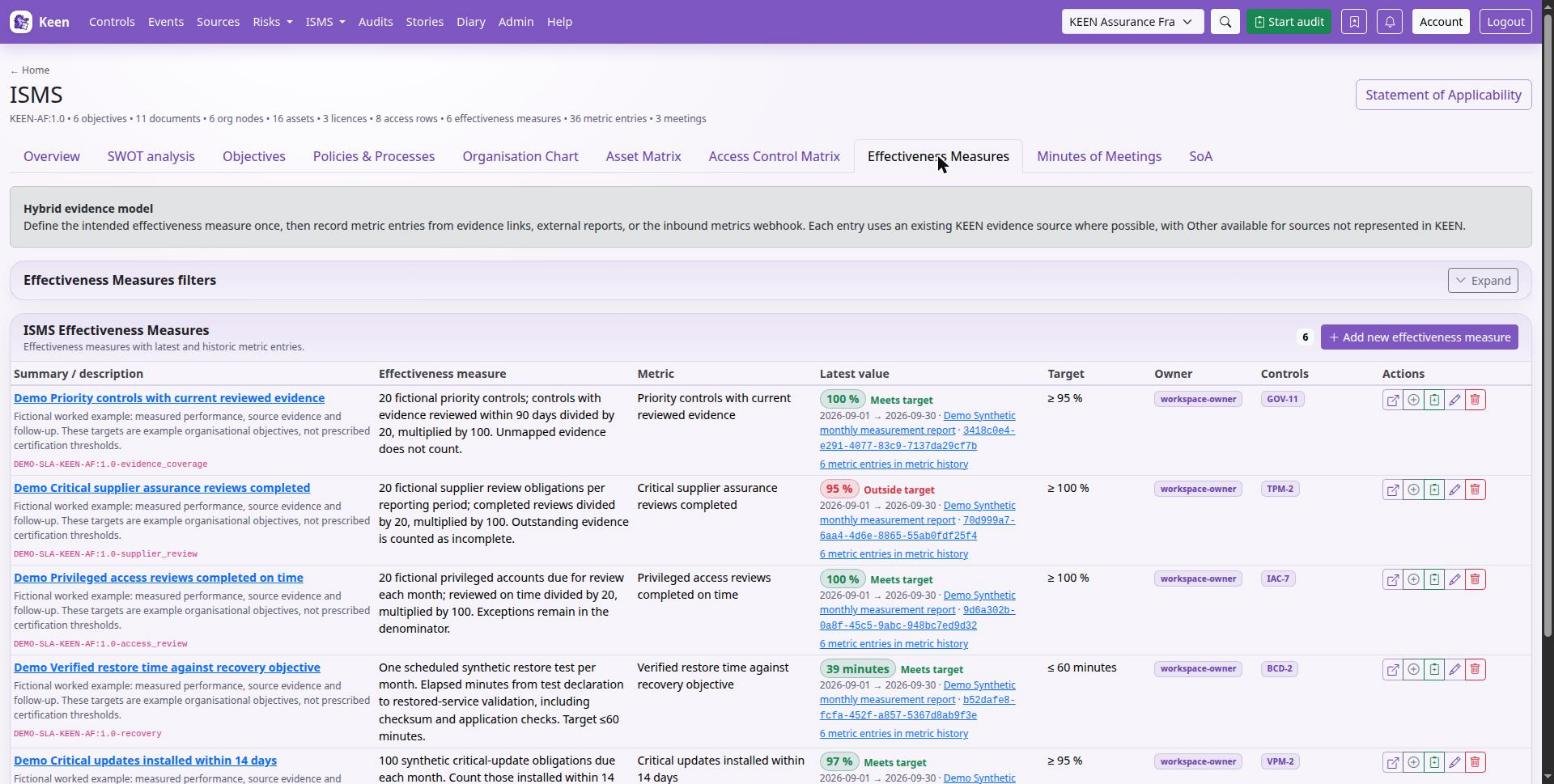
Example. “Critical vulnerabilities fixed within agreed time” could use the percentage of eligible findings resolved on time, with a target of 95%. The measure must define the denominator, the exclusions, the reporting period and the source. Before you read “No new findings” as good news, confirm the scan ran and covered the intended systems.
Going deeper: metric keys and automated ingestion
A metric key must be unique and may use letters, digits, dot, underscore, colon and hyphen. Automated metric ingestion has its own endpoint and authentication; ask the administrator to validate one sample against the configured provider, key and period before enabling recurring submissions.
Interpret effectiveness measurements
Precision in the definition is what makes the numbers comparable later. Say what is counted, over which period, with which exclusions, in which unit, and which threshold means success. Link the measure to the controls it helps assess.
- Create the measure with its summary and description, plus owner, frequency, expected source, target value, unit and threshold operator.
- Give an automated measure a stable, unique metric key and use the same key in the submitting integration. Changing the display title is different from changing this identifier.
- Record each observation with its date, period, numeric value or qualitative result, unit and notes, and a source title, reference or event where available.
- Check the Metrics and Visualisations views with source and date filters, so you compare like periods and populations.
- Open an entry to inspect its source and notes. Correct a mistaken observation deliberately and use the changelog to understand corrections.
- Sample the measure and the relevant observations into an audit. The measure explains the test; the entries supply the results.
Example. A backup-restore measure might target at least 95% successful scheduled tests. A value of 95 needs a denominator and a period, such as 19 of 20 tests completed in September. “One restore exceeded the objective” belongs in the note that explains the result.
Understand automatically recorded zeros
For eligible measures, Keen can record a zero for a closed calendar month with no observations. These entries are labelled Automatically recorded zero. They say that nothing was recorded under that rule; they do not prove that nothing happened, and they are not evidence that data was delivered.
Going deeper: which measures qualify
The rule covers monthly and required/as-required measures whose target is zero and whose operator permits zero (blank, equals or at-most). An existing observation for the period prevents an inferred zero. Establish incident and exception coverage through the relevant source evidence and check collection coverage before relying on these entries.
Send effectiveness measurements
A reporting job in another system can post observations straight into a measure. Keen writes the example call for you.
- In ISMS → Effectiveness measures, define the measure with its metric key, unit and thresholds, and save it.
- Expand Send measurements from another system in the editor or on the measure's detail page, and copy the generated curl or Python example into your reporting job. It already contains this installation's endpoint, the metric key, the framework and the unit.
- Replace the example value of zero with the observed result. Optional
period_startandperiod_enddescribe the reporting period asYYYY-MM-DD. - Supply the webhook secret your administrator configured as
KEEN_METRICS_SECRETin the reporting environment, andKEEN_METRICS_HEADERif a custom header is configured. The examples reference these as environment variables.
Each successful POST creates a metric entry, so repeated submissions produce additional entries. Keen evaluates each result against the measure's threshold. Review it, link it to the relevant requirements and sample supporting evidence into an audit when appropriate.
Going deeper: the webhook behind the examples
Your administrator configures the isms_metrics webhook and its secret in the deployment. Measurements are evidence of observed performance, such as service availability or patch coverage; the threshold remains the criterion Keen applies.