Administering Keen
Organisation frameworks and risk library
Chapter 4 of 30
Choose organisation frameworks
Keen ships 94 framework catalogues, and most organisations use two or three. This chapter chooses which ones appear, maintains their controls, and explains where the catalogues and the risk library come from.
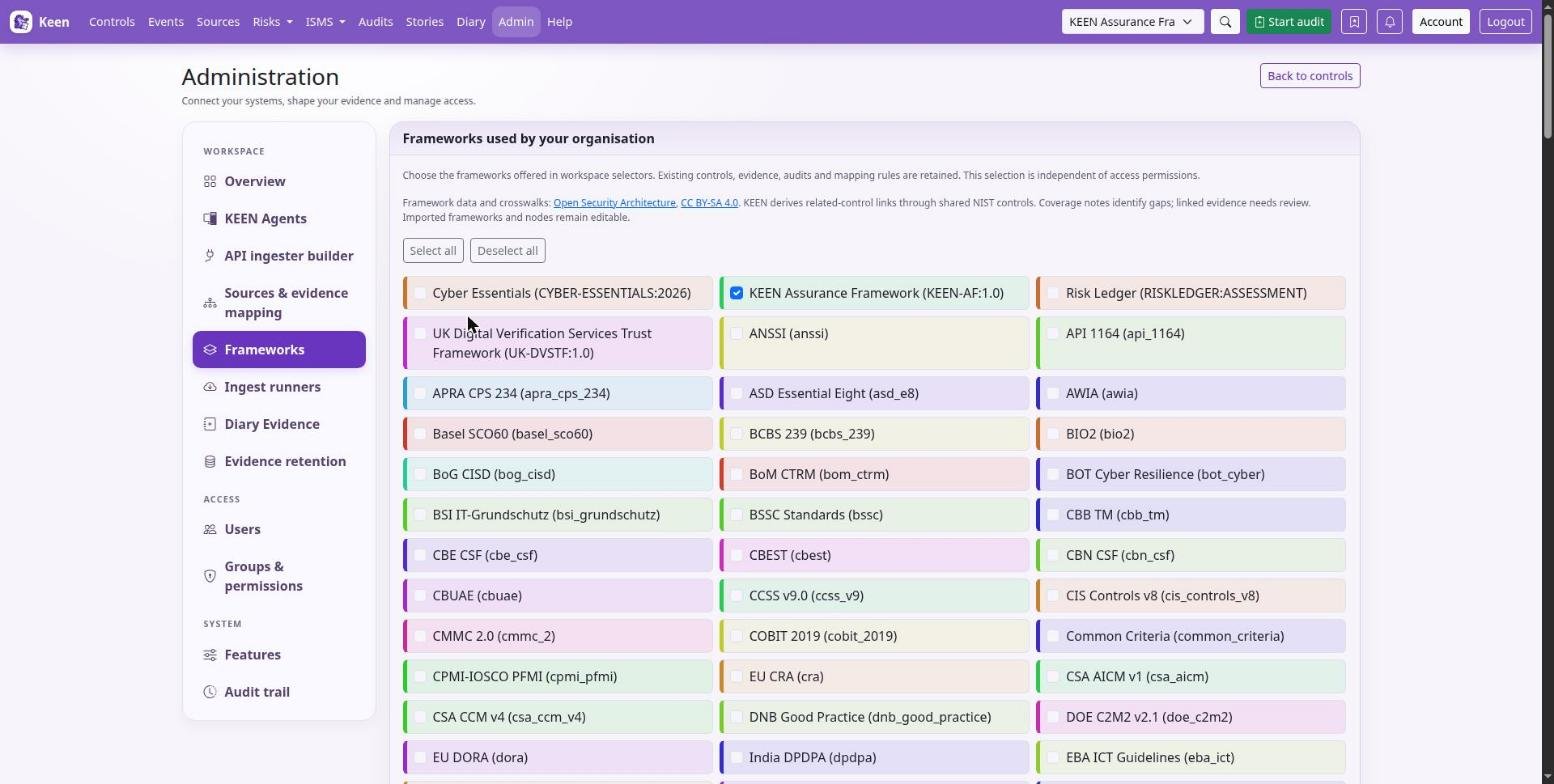
In Administration → Frameworks, select the frameworks your organisation uses and choose a default. The workspace catalogue, navigation and mapping selectors follow that selection. Select all and Deselect all change the pending selection; Save applies it. At least one framework must be selected, and distinctive card colours help tell them apart.
Hiding a framework keeps its controls, audits, evidence and mapping rules; it changes visibility, nothing else. Rules that should stop mapping evidence must be disabled separately. Reload open pages to refresh navigation; an unavailable previous selection falls back to the organisation default.
Going deeper: limiting the choices from the environment
Set KEEN_ENABLED_FRAMEWORKS=ISO27001:2022,KEEN-AF:1.0 in .env to limit the choices offered in Administration. Use exact slugs separated by commas; an empty value allows every framework and unknown slugs are reported in Administration. If an environment change excludes all saved choices, the available environment frameworks are used until another selection is saved.
Manage frameworks and the risk library
Admin → Frameworks is the editor. Select a framework or choose New framework, enter its slug and descriptive fields, and Save framework. Add Clause, Control or Custom nodes with references, titles, hierarchy, scope and related clauses. The node being edited is marked in the tree, stays marked after a save and scrolls into view; Previous and Next in the node details open the neighbouring nodes in the tree's order. Make a small change and check the result before a broad edit.
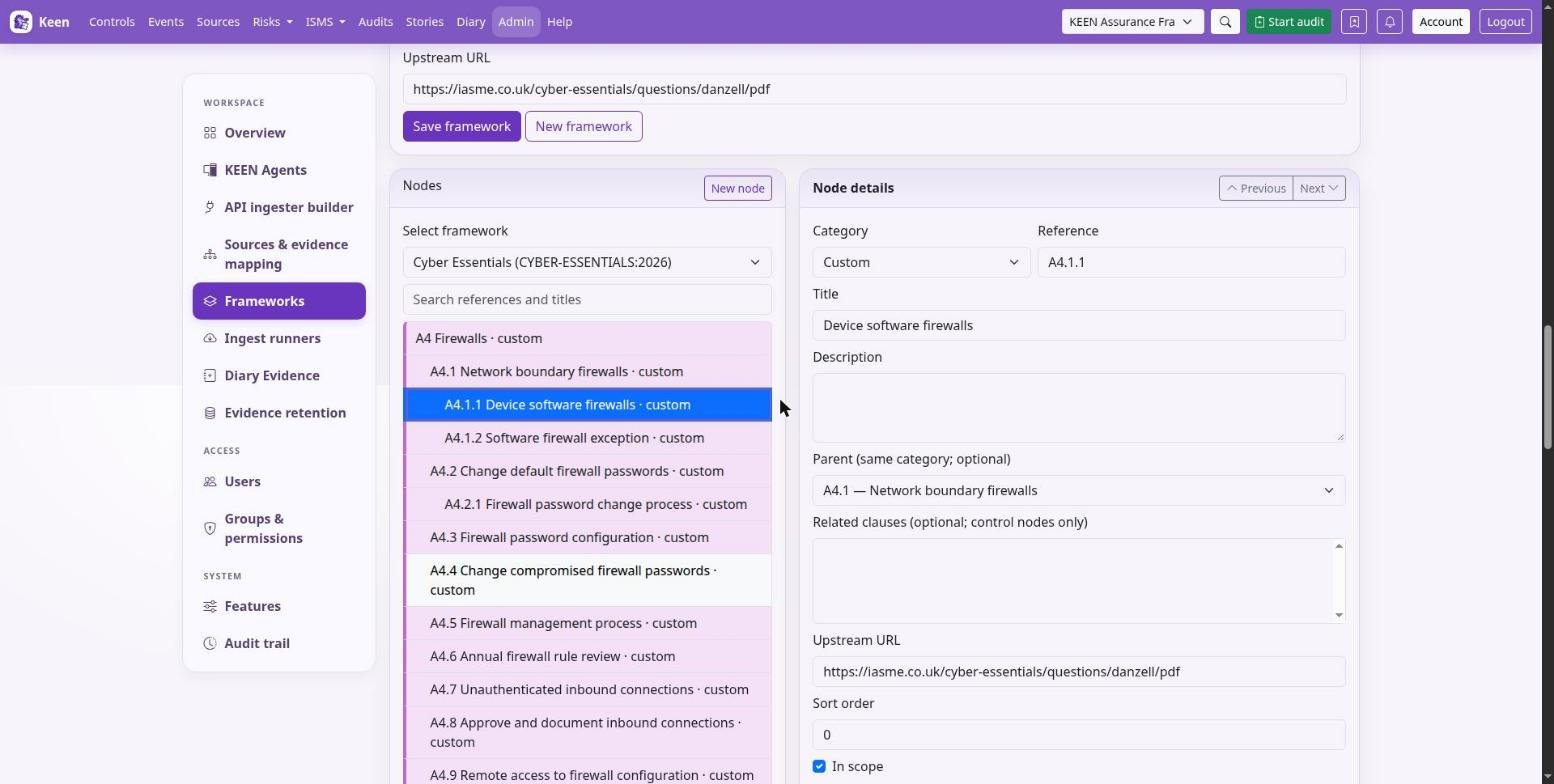
Identities are stable. Slugs and node identities are not renamed in place. Deletion is blocked by children, clause relationships or evidence mappings; review the impact on linked risks, audits and other records before removing content, and never use direct SQL to evade a dependency check.
The risk register settings apply to the shared set of risk scenarios: the editor, register and heatmap use the same 1-5 likelihood and impact fields. Library templates are reusable starting points whose suggested ratings and KEEN-AF control links need local review; when a template changes, review the assessments made from it individually.
Going deeper: where the seed data comes from
The migration chain seeds the bundled framework catalogues, including Keen Assurance Framework (KEEN-AF:1.0), and the reusable risk library. Seed data ships with the release, and migrations load the version included in that release. Changes you make in the application belong in PostgreSQL backups; ordinary restarts never overwrite them.
Open Security Architecture framework catalogues
Of the 94 frameworks, 88 come from an offline snapshot of Open Security Architecture (OSA) dated 8 October 2026; the other six are Keen Assurance, UK Digital Verification Services Trust Framework, Cyber Essentials, Risk Ledger, ISO 9001:2015 (including Amendment 1:2024) and ISO 9001:2026. OSA machine names and clause references match its API, including iso_27001_2022, soc2_tsc and hipaa_sr; the HIPAA catalogue covers the Security Rule.
A fresh installation enables only Keen Assurance; the imported frameworks start disabled. Their metadata and nodes stay editable, and you can add local controls or create new frameworks. The control page shows source details and the related-control crosswalk.
Going deeper: licences and cross-framework links
OSA's data and Keen's catalogue adaptation are licensed under CC BY-SA 4.0, separately from Keen's software licence. Control details keep source references, coverage estimates, rationale and gaps; the catalogues carry OSA's descriptions and assessments of the requirements, so follow the upstream links for authoritative normative text and usage rights.
Keen derives cross-framework related-control links through shared NIST SP 800-53 references. Directly mapped evidence appears under related controls without duplicating events, each event counts once per control, and inheritance is one hop: inherited evidence does not propagate onward. Shared references guide an overlap assessment; review the linked requirements and evidence for your own decisions. Keen's own reviewed links between its frameworks are attributed separately.