Administering Keen
Manage rules, YAML and historical mapping
Chapter 6 of 30
Operate evidence definitions
An evidence definition is a mapping rule with its collection input attached: it says which events to collect, which of them count, and which controls or clauses they support. This chapter writes a good definition, keeps the rule set under control, and reconciles past evidence when a rule changes.
Admin → Evidence definitions is the working interface for collection inputs and mappings. The Source catalogue distinguishes adapter enablement, collection items, definitions and observed events; connection credentials and adapter enable flags stay in the server environment.
Write a definition
Choose Create mapping, or Create mapping from this event on an event. The editor takes three steps, named in the numbered buttons at the top: a finished step's button takes you back to it, and Next checks the current step before moving on.
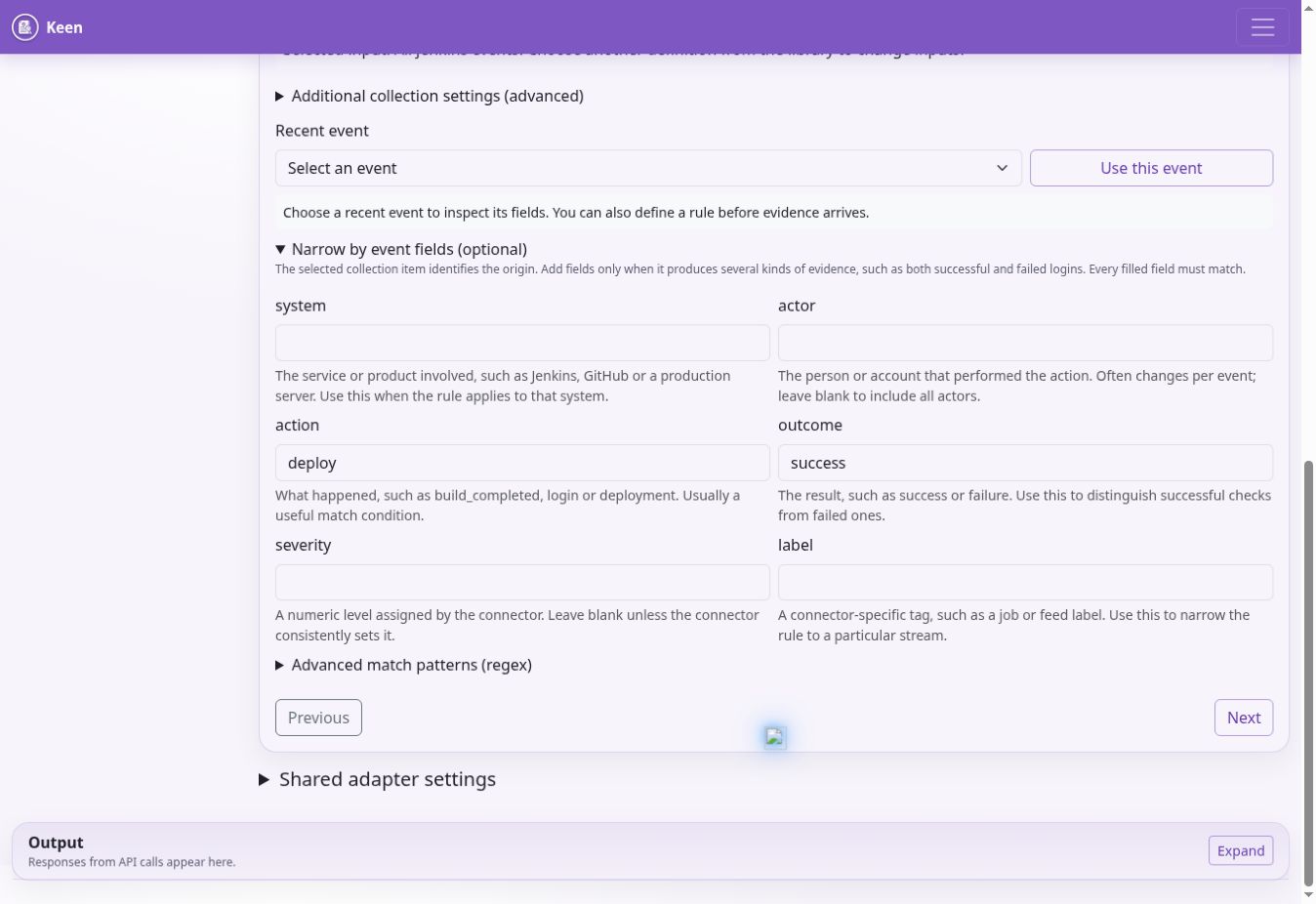
- Matching events. Choose where the evidence comes from and, where it matters, the query, job, feed or page to collect. Start from a recent event to copy its values, then fill in only the conditions that matter: exact values, structured fields, and the extra filters and patterns under More filters. The sentence under the conditions says in plain words which events will match.
- Name and controls. Name the mapping after what the evidence demonstrates, in a sentence a reviewer will understand. Choose each framework control or clause it supports and click Add, and review any description-based suggestions.
- Check and publish. The summary repeats the events, the name and the targets, each with Change to go back to its step. Preview the matches, checking the near misses as well as the matches, then choose Save rule. A saved rule also offers Apply saved rule to past evidence, its revision history and Delete definition.
Keep the rule tied to its input. Choose All events from this source only when a source-wide match is intended; otherwise leave the rule on its query, job, feed, project, stream or page. Stable collection identifiers stop evidence from another input being treated as interchangeable merely because it uses the same adapter.
Every filled matching condition must match. Prefer exact field matches and use advanced regex only where necessary. Creating another definition for the same collection item lets different event outcomes map to different targets without collecting twice.
Going deeper: targets, predefinition and disabling
Target references must exist in the selected framework. Each target records whether it names a control or a clause, and matching evidence attaches only to that item, even where a clause and a control share a reference; rename duplicated control references before targeting them. Tick Predefine this rule before evidence is available under Advanced rule settings only when evidence is not yet available, then schedule a review after first collection. Confidence is between 0 and 1. Disabling a definition stops its application in the rule set; it does not prove that every historical mapping has been removed.
Configuration storage and concurrency
PostgreSQL holds managed configuration documents and their revisions. Saving a definition publishes its collection item and rule together and checks configuration versions; a 409 conflict means another writer changed the data, so reload, inspect the newer version and reconcile deliberately.
Going deeper: bootstrap files and advanced panels
The migration chain initialises managed configuration from the supplied inputs or existing database overrides. Once those records exist, database configuration takes precedence; use the web editors to update a migrated installation's rules and collection settings. Preserve bootstrap files for recovery and provenance, and back up the database to preserve live settings.
Additional collection settings is an advanced per-item JSON panel and Shared adapter settings applies common adapter options. Neither is a credential store. Keep connector-specific fields consistent with the adapter schema and retain a configuration revision before a substantial change.
Export mapping rules to YAML
Under Sources & evidence mapping, expand Browse existing mappings, choose a source and select Export YAML for selected source. All sources exports the complete rule set, including cross-source regular-expression rules; text search does not limit the download. Disabled rules, rule IDs, field conditions, collection selectors, confidence and framework targets are all preserved.
The download uses the rules: format read by KEEN_RULES_PATH, normally /app/config/rules.yml. Merge source exports into a single rules list with unique IDs, and configure collections and credentials separately, preserving the referenced collection IDs and framework targets.
The file is read strictly. A rule Keen cannot read exactly as written, such as one with a misspelt key, an unquoted number where text is expected or an unsafe pattern, is skipped, and the API and worker logs record a warning naming the rule and the problem. Check the logs after changing the file.
Going deeper: moving from UI-managed to file-managed rules
Database-managed rules take precedence over YAML. For an existing UI-managed installation, export All sources and back up the database first. Deploy the complete YAML, then remove the active rules row from managed_configurations in a controlled database transaction; revision history remains. Saving a rule through the UI creates a database override again, and previously mapped evidence remains until explicitly reprocessed or pruned.
Historical mapping and revision recovery
A saved rule applies to new events. To apply it to evidence collected earlier, save it and choose Apply saved rule to past evidence, or tick Apply this rule to previously collected evidence in the background while saving. The background job reports its progress; a saved rule and a completed backfill are separate outcomes, so check the job before launching another.
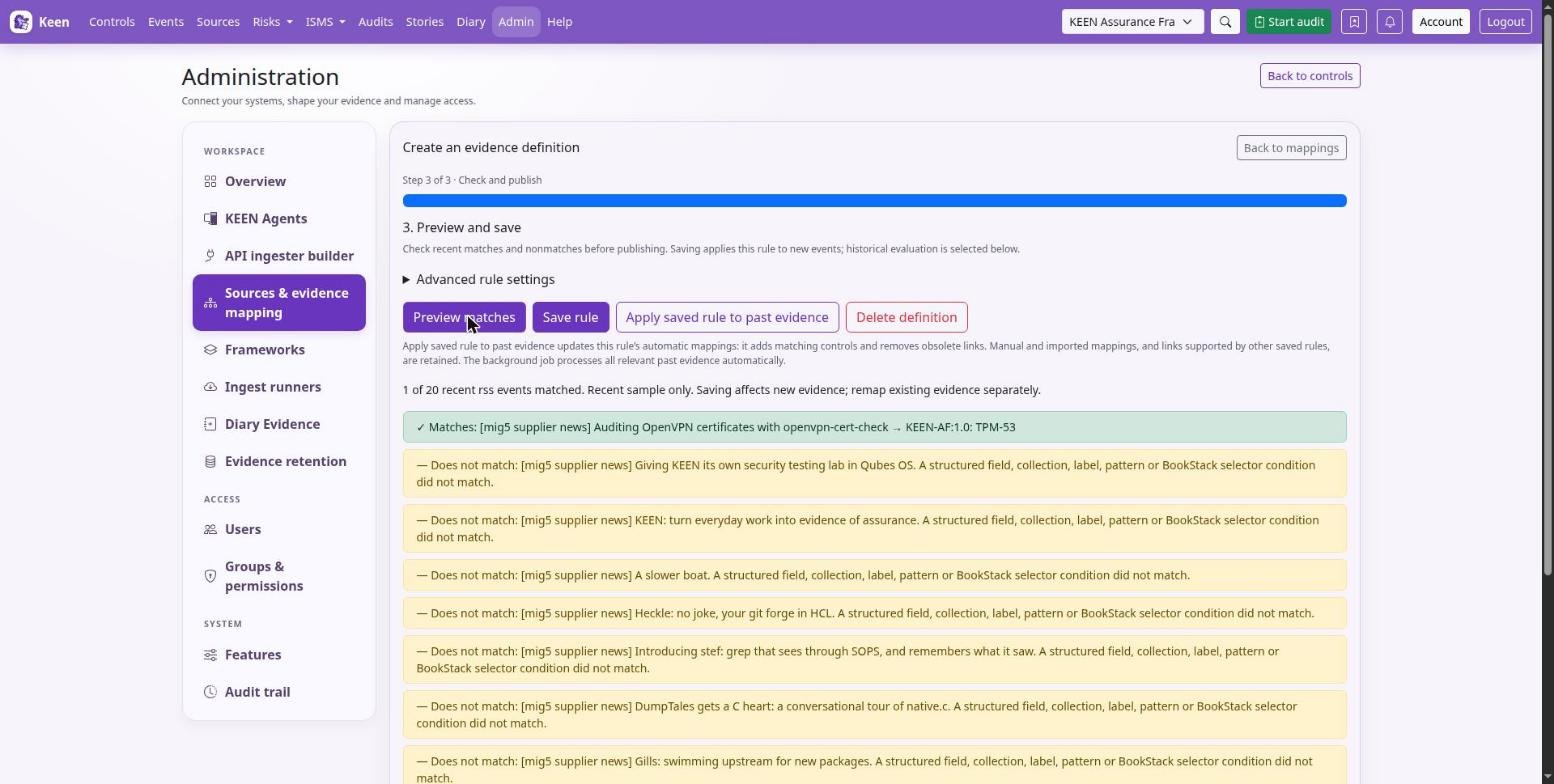
The job reconciles the automatic mappings owned by that rule: it adds matching controls and removes links to controls removed from the rule, including links on events that stop matching. Manual and imported mappings remain, as do links still supported by another active rule. After it completes, reopen an event to review its controls.
Remap a wider range
Admin → Sources & evidence mapping → Evidence mapping → Remap old events offers broader filtering. By default it finds events with no mappings; Include already-mapped events allows additive mapping of those already linked. Choose a bounded source and time range first.
Going deeper: ownership, deletion and restoring a rule set
Jobs are durable and resumable, and worker and beat availability matter to their recovery. Historical mappings with uncertain rule ownership are preserved for review, and deleting a definition retains its historical mappings.
Restoring a prior rule set recovers configuration only. After restoring, preview examples and apply each affected saved rule to past evidence to reconcile its automatic mappings; mappings, evidence and audits retain their own history. If aggregate counts remain wrong, investigate the control-evidence statistics and cache before collecting replacement evidence.