Administering Keen
Evidence storage and retention
Chapter 28 of 30
Evidence storage, integrity and retention
Evidence has two halves: the searchable record in PostgreSQL, and the captured artifact bytes in a local directory or an S3-compatible bucket. This chapter explains how Keen protects stored evidence, what the operator must configure for that protection to hold, and how retention and purging decide what is removed.
An artifact record stores its URI, SHA-256 digest, content type, size and capture information. Redaction runs before persistence, so the recorded checksum describes the stored, redacted bytes.

Diagram source (Mermaid)
flowchart TB
  K["Keen writes a redacted artifact"] --> W{"Configured backend"}
  W -->|Local| L["Create a new file; refuse replacement"]
  W -->|S3| S["PutObject to the configured bucket"]
  P["Bucket and IAM policy"] --> S
  H["Hosted mode: conditional create and required versioning"] --> S
  S --> V["Return object version ID when available"]
  L --> D["PostgreSQL: artifact URI, SHA-256 and event reference"]
  V --> D
  D --> R["Read the recorded object version for review or export"]
  O["Optional Object Lock: operator-configured retention or legal hold"] -.-> S
| Storage control | What Keen does | What the operator configures |
|---|---|---|
| Local artifacts | Creates a new file and refuses replacement at an existing key. | Filesystem access, disk encryption, backups and protection from privileged modification/deletion. |
| General S3 storage | Writes an object; records and reads its version ID when returned by the provider. | Versioning, encryption, least-privilege IAM, deletion policy and provider support. |
| Hosted S3 write protection | Sends If-None-Match: * and requires a returned version ID. The supplied host-role bucket policy denies deletion and requires conditional creation. | The actual deployed role, bucket policy and versioning; recovery/operator permissions are separate. |
| S3 Object Lock | Uses the bucket's storage behavior. The artifact writer does not set a per-object legal hold or retention period. | Enable Object Lock and a suitable default retention policy or legal hold through the storage platform. Verify enforcement on new objects. |
Choose the protection your retention policy requires. Versioning preserves object versions and a recorded version ID selects the captured one; SHA-256 detects a change when bytes are verified against the recorded digest; AWS Object Lock protects object versions according to governance or compliance retention and legal holds. The supplied short-lived hosted bucket configuration leaves Object Lock disabled, so a long-lived installation establishes that guarantee separately.
Going deeper: keeping evidence readable and verifying the setup
Keep database backups and the referenced object versions together, and protect encryption keys for as long as the retained evidence must remain readable. Review lifecycle rules for current objects, noncurrent versions, abandoned objects and backups; where Object Lock applies, cleanup must respect its retention and hold rules. Governance bypass depends on granted permissions; compliance retention is stricter.
Verify the deployed configuration with an approved test object: capture it, confirm its version and Keen reference, test overwrite and deletion with the application role, and check retention metadata if configured. Keep recovery credentials separate from the runtime. References: AWS Object Lock behavior and Object Lock configuration.
Evidence retention and purging
Administrators open Evidence retention to choose a maximum event age in days, keep the newest N unsampled events, or keep everything. Settings cover all frameworks and sources, and automatic deletion starts disabled. Count-based retention keeps audit-protected events in addition to the configured allowance.
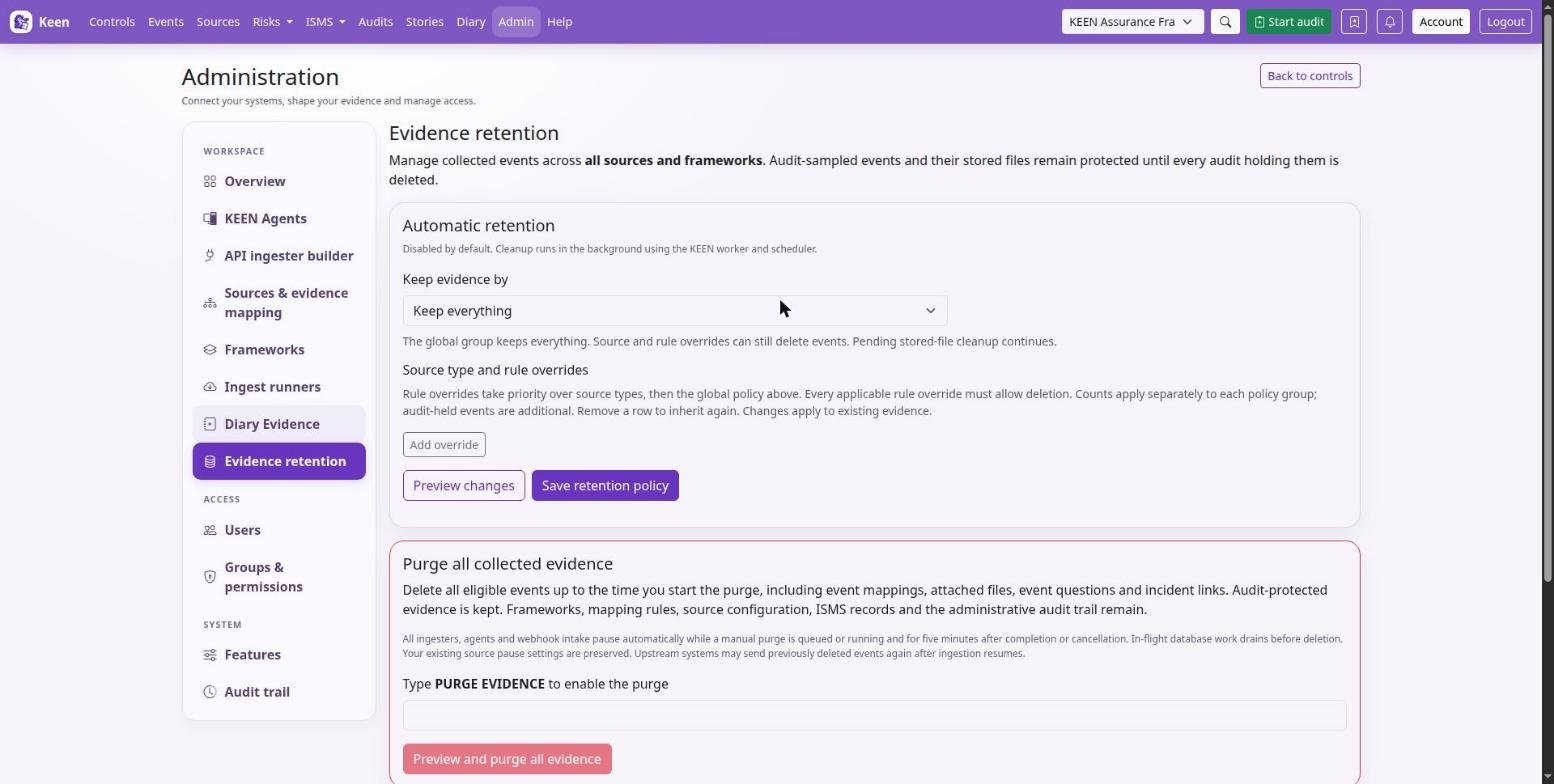
Measure age from the evidence timestamp. Retention counts age from when the evidence happened. Long RSS feeds, mail backlogs, log archives and paginated issue lists record publication or event times in the past, so freshly collected historical items can be deleted by the next retention pass. If a source must keep its historical items, give it a source-type override (Keep everything or a longer maximum age) before enabling age-based deletion. Age is compared in UTC.
Source type and rule overrides
- In Evidence retention, choose Add override and select Source type or Rule ID. Changing the scope clears the selection.
- Pick an existing value from the dropdown; labels and rule descriptions appear beside their exact identifiers. Source types use the event's source value, such as
githuborkeen-agent, and cover every connection of that type. - Choose Keep everything, Maximum age (days) or Newest events to keep. Preview shows the combined effect of the global policy and all proposed overrides; Save applies it to existing and future evidence.
Rule overrides take priority over source-type overrides, which take priority over the global policy. Remove an override row to restore inheritance. The source detail page and the mapping rule editor each link to their retention settings, and overrides whose source or rule no longer exists stay labelled Unavailable - saved override for review or removal.
Going deeper: how rule overrides and counts are evaluated
A rule override applies to events with recorded automatic mappings from that rule, across frameworks; it does not re-run the rule's current conditions. If several overridden rules own an event, every applicable rule policy must permit deletion, and Keep everything on any of them preserves the event. Disabling or deleting a rule does not remove its retention override, because existing recorded mappings still determine ownership; removing or remapping those links can change which policy applies, and a deleted rule's override can be removed in Evidence retention.
Count limits apply separately to each policy group. The global count covers events with no applicable override; a source count covers events of that type with no applicable rule override; a rule count covers its automatically mapped events, counting each event once even when it maps to several controls. An event shared by several overridden rules counts in each rule's allowance, and audit-held events remain additional to every allowance. To stop all automatic deletion, set the global policy and every override to Keep everything, or remove the overrides.
What retention never removes
Audit-sampled events remain protected until every audit holding them is deleted; removing a displayed sample preserves the hold, and deleting the audit (Delete on the Audits list or Delete audit on its page) releases it. Sampled effectiveness measurements also protect their linked events. Diary entries are persistent records, so no retention mode or purge removes them, and diary source-type overrides have no effect on them.
Purge all collected evidence
To clear collected evidence, type PURGE EVIDENCE, preview and confirm. The purge ignores the age, count and Keep everything policies; audit holds and retained artifact references still protect evidence. It removes eligible events, their mappings, attachments, event questions and incident links up to the purge start time. Frameworks, rules, source settings, ISMS records and the administrative audit trail remain, and upstream sources can resend deleted events once ingestion resumes.
Going deeper: what happens while a purge or cleanup runs
All ingesters, agents and webhooks pause while a manual purge is queued or running and for five minutes after completion or cancellation; existing per-source pause settings are preserved, and active database transactions finish before deletion. Cleanup uses the worker and scheduler, and the status panel shows database progress and stored files awaiting deletion. Give the worker the same artifact volume as the API, or the required S3 deletion permissions.
Stored-file cleanup is durable and continues after cancellation or disabling retention. Exact S3 versions are deleted where recorded; legacy versionless URIs in versioned buckets require operator review to identify the correct version. S3 Object Lock and legal holds are respected and inaccessible files remain queued for retry. Configure S3 lifecycle policies to preserve evidence held for audits.